Let Nvidia Prefer Maximum Performance for OneNote to Solve Scrolling Stuttering
2024-04-17 06:41
Because OneNote will use some features of the graphics card to improve the display speed of OneNote.
Therefore, the graphics card settings still have a relatively large impact on OneNote.
Scrolling with OneNote under Windows 11 is stuttering.
Go to Nvidia Control Panel,
Maximize performance with NVIDIA graphics cards for OneNote.exe. This way, when using OneNote, there will be no stuttering.
Therefore, the graphics card settings still have a relatively large impact on OneNote.
Scrolling with OneNote under Windows 11 is stuttering.
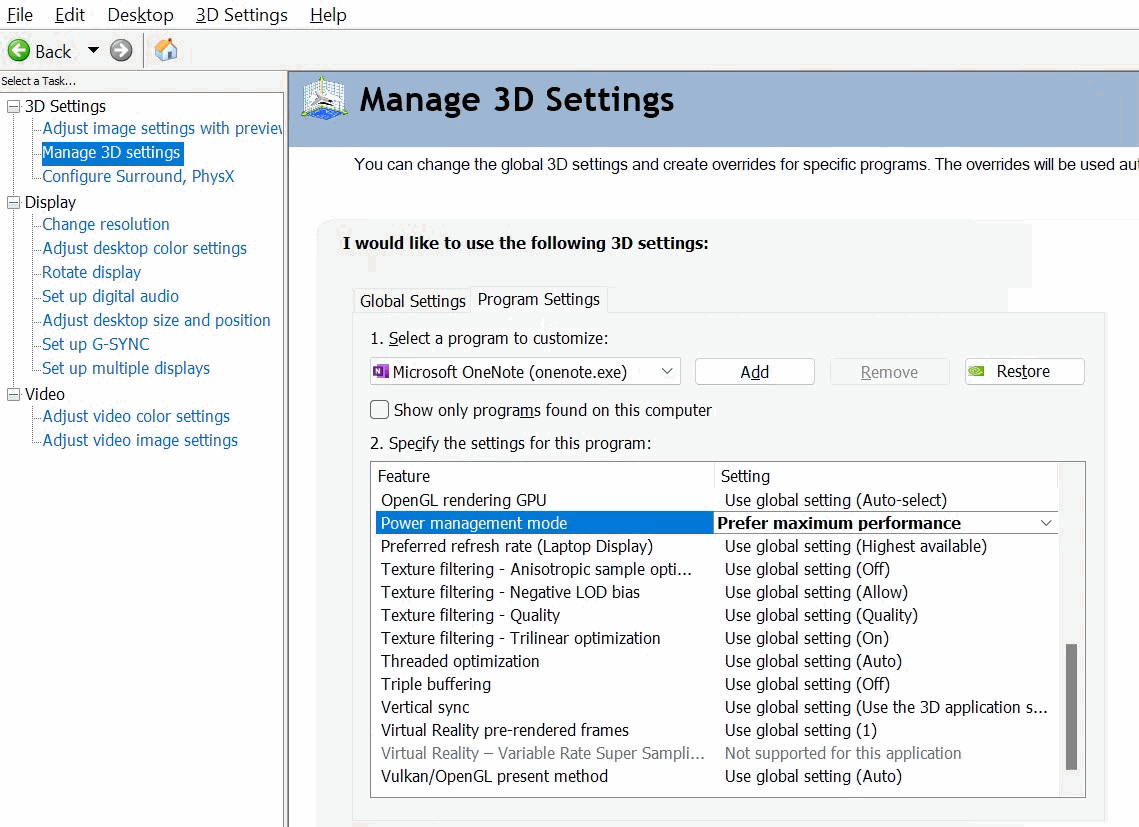
Go to Nvidia Control Panel,
- then click on "Manage 3D Settings" on the left
- then on the "Program Settings" tab. Select the OneNote.exe
- Scroll down to "Power Management Mode"
- Change it to "Prefer Maximum Performance".
Maximize performance with NVIDIA graphics cards for OneNote.exe. This way, when using OneNote, there will be no stuttering.
| EXE Addins | Cloud Addins | MAC Addins |
Related Documents
- Office OneNote v2606, v2607 freezes when switching to normal pen drawing, and the drawn shapes will appear after respond
- OneNote v2604 Changed the Copy function Ctrl+C from Image format to Plain Text Format
- How to setup the Quick Notes section of OneNote?
- How to fix the OneNote notebook pane fills the entire window and flickering when Collapse Sidebar?
- 2026.3.20 OneNote cannot login today: It doesn't look like you're connected to the Internet. 0x800704cf [Fixed]

