OneNote Has Set a New Default Notebook Location, why is it still Empty after Reopen Notebooks?
2023-05-14 09:55
Question:
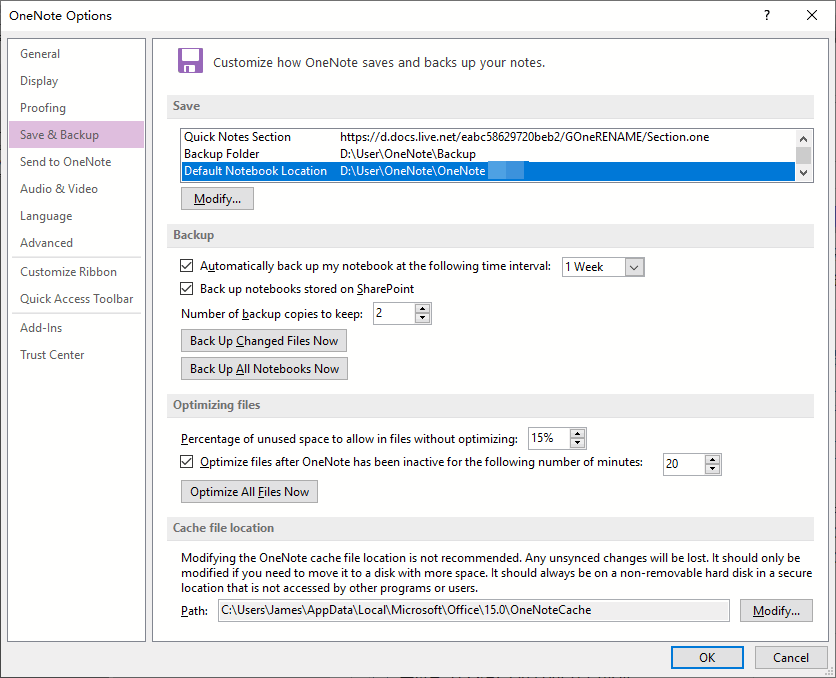
In the OneNote Options window, under Save and Backup, change the "Default notebook location" to D:, why is it still Empty after Reopen Notebooks?My assumption is that the notebooks in OneNote are all moved to that location.
Answer:
OneNote's default notebook location, which works for OneNote's local notebooks only. It is not valid for notebooks on OneDrive.com.This default notebook location is only effective for newly created local notebooks. It is not valid for older notebooks.
When you specify "This PC" in OneNote's File –> New –> after entering the notebook name, the new local notebook created will be placed in this "Default Notebook Location" by default.
| EXE Addins | Cloud Addins | MAC Addins |
Related Documents
- How to fix the OneNote notebook pane fills the entire window and flickering when Collapse Sidebar?
- Why New Notebook and Options feature greyed out and not available in OneNote?
- How to Hide All Panes include Notebook Pane and Page List Pane in Windows Office OneNote?
- OneNote: You no longer have permission to access this notebook. We’ll sync again if permissions are restored
- Event:2024.10 some OneNote sections disappear, reopen the notebook not synchronize these disappeared sections

