Exe: How to Sign in OneNote 2016 Using Work or School Account?
2019-11-26 16:04
Question:
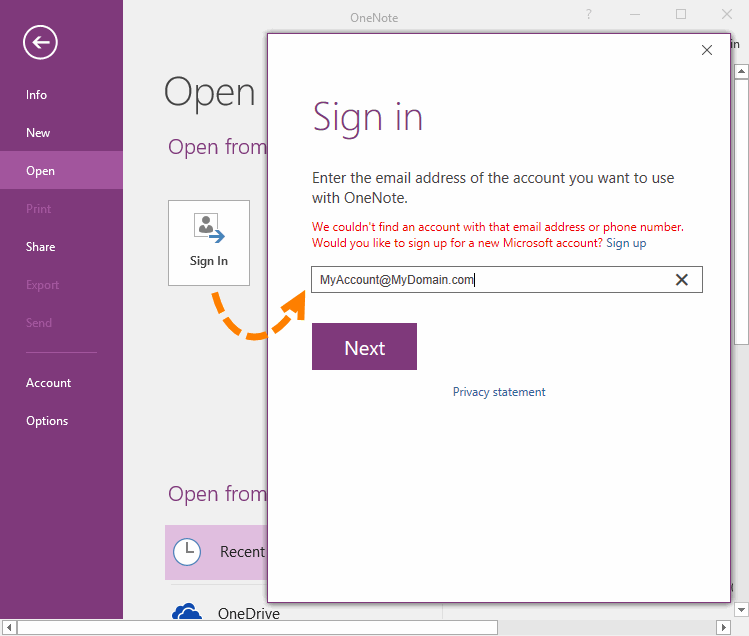
In OneNote 2016, in the Open page, click the "Sign In" button, and enter the work or school account, it will display:
We couldn't find an account with that email address or phone number.
Would you like to sign up for a new Microsoft account?
How and where to sign in Work or School Account?
In OneNote 2016, in the Open page, click the "Sign In" button, and enter the work or school account, it will display:
We couldn't find an account with that email address or phone number.
Would you like to sign up for a new Microsoft account?
How and where to sign in Work or School Account?
{C}
Answer:
To sign in Work or School Account, in OneNote, click "Open" tab -> "Open" page -> Open from other locations -> Add a place -> Office 365 SharePoint.
In there, you can login the Work or School Account.
To sign in Work or School Account, in OneNote, click "Open" tab -> "Open" page -> Open from other locations -> Add a place -> Office 365 SharePoint.
In there, you can login the Work or School Account.

| EXE Addins | Cloud Addins | MAC Addins |
Related Documents
- How to setup the Quick Notes section of OneNote?
- How to fix the OneNote notebook pane fills the entire window and flickering when Collapse Sidebar?
- How to solve a new page on Android, which is invisible in PC Office OneNote and not synchronized?
- How to fix display clutter on my Surface external display when dragging OneNote from one screen to another?
- How to Hide All Panes include Notebook Pane and Page List Pane in Windows Office OneNote?

