Search
OneNoteGem
  • Home
  • Addins
    • Windows Office Addins >
      • Gem for OneNote
      • OneNote Search Bar
      • OneNote Gem - Favorites
      • OneNote Batch
      • Pons for MindManager and OneNote
      • Mind Map for OneNote
      • Pons for Visio and OneNote
      • Row to OneNote
      • Auto OneNote
      • Favorite to OneNote
      • Bridge for EndNote and OneNote
      • Anchor to OneNote
      • Anchor to OneNote for PDF
      • Bring to OneNote
      • Gem Table for OneNote
    • Windows Cloud Addins >
      • CiteBoard for OneNote
      • OneReader
      • OneMind for Web OneNote
      • OneNote Reminder Cloud
      • OneNote Batch Cloud
    • Mac Addins >
      • Gem Menu for Mac OneNote
      • CiteBoard for OneNote
      • Bring to Mac OneNote
      • OneMind for Mac OneNote
      • OneNote Reminder for Mac
      • OneNote Batch for Mac
      • Fix One for Mac - Fix OneNote Login, Sync Tools
    • Android Addins >
      • CiteBoard for OneNote
      • Fix One for Android - Fix OneNote Login, Sync Tools
    • Cross-Platform Addins >
      • OneNote Reminder
      • OneMind for OneNote
      • CiteBoard for OneNote
      • Fix One - Fix OneNote Login, Sync Tools
    • Markdown Addins >
      • Gem for OneNote
      • One Markdown
    • Mind Map Addins >
      • OneNote Gem - Favorites
      • Pons for MindManager and OneNote
      • Mind Map for OneNote
      • Pons for Visio and OneNote
      • OneMind for OneNote
    • Other Addins >
      • Gem Menu for OneNote UWP
      • One Markdown
      • Clip to OneNote
      • WordNote
      • OneShare
      • Fix One for Windows - Fix OneNote Login, Sync Tools
      • OneNote for Windows 10 Reviver - UWP Reviver
  • Buy
  • Documents
  • FAQs
  • Templates
  • Support
  • Release
  • WordNote
Mind Map for OneNote
 
 
Using OneNote native elements to create Mind Map

Available Microsoft Lens Version Download after It is retired in 2026

2026-05-09 10:06
 

Microsoft Lens has be retired in January 9, 2026

Microsoft's official statement:

The Microsoft Lens app will be retired from iOS and Android devices starting January 9, 2026, and will no longer be supported after February 9. You can continue to scan documents in the app until March 9, 2026. After that, you will not be able to create new scans, but you will still be able to access your previous scans if the app remains installed on your device.
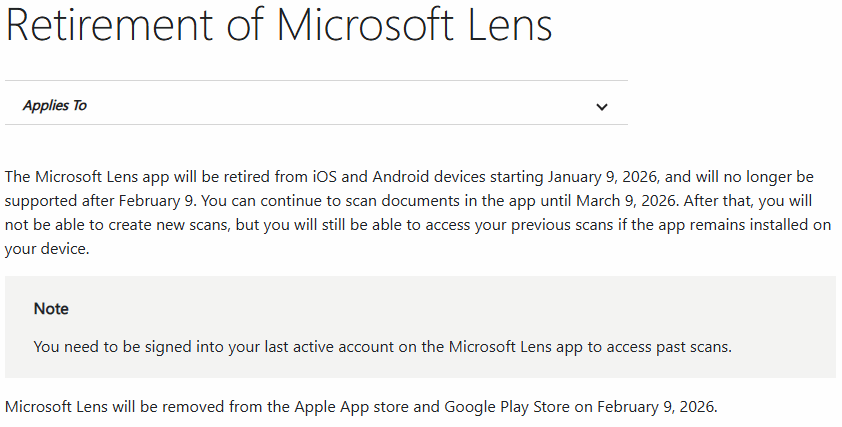
 

Microsoft Lens has be retired in January 9, 2026


The Last Version of Microsoft Lens release in 2026

The last release of Microsoft Lens in 2026 is: 16.0.19628.20008
In May 2026, it is still possible to install Microsoft Lens from the Google Play Store with version 16.0.19628.20008.
It can be installed, but it is no longer available. After installation, open Microsoft Lens and a prompt appears:

Move to OneDrive App to keep scanning
To keep scanning and see your past scans, go to the OneDrive app.


Click to View all Content
 
EXE Addins Cloud Addins MAC Addins

Related Documents

  • How OneNote delete a “Content Not Yet Available” page?
  • Office 2024 Preview Download
  • How to Download and Install 32-bit Adobe Acrobat Reader?
  • Microsoft Mac Office Remove License Tool Download
  • OneNote Download from OneNote.com Install in Win10 Can Create Local Notebooks in 2021
Command Line
Tag System
MindMap Add-Ins Comparison
Search Add-Ins Comparison
One Markdown Syntax
Table Formula
Gantt

Gem Menu Templates
Repair OneNote
OneNote Download
English website Chinese website
Mobile Site
Copyright © 2011-2026 Digital GemSoft. OneNoteGem.com All Rights Reserved.