Clip to OneNote for Mac Safari
2019-11-26 16:04
After Microsoft publish OneNote for Mac, next Microsoft release an OneNote Clipper, it can lets you save webpages from Mac Safari into your OneNote notebook.
How to install OneNote Clipper to Mac Safari web browser
How to install OneNote Clipper to Mac Safari web browser
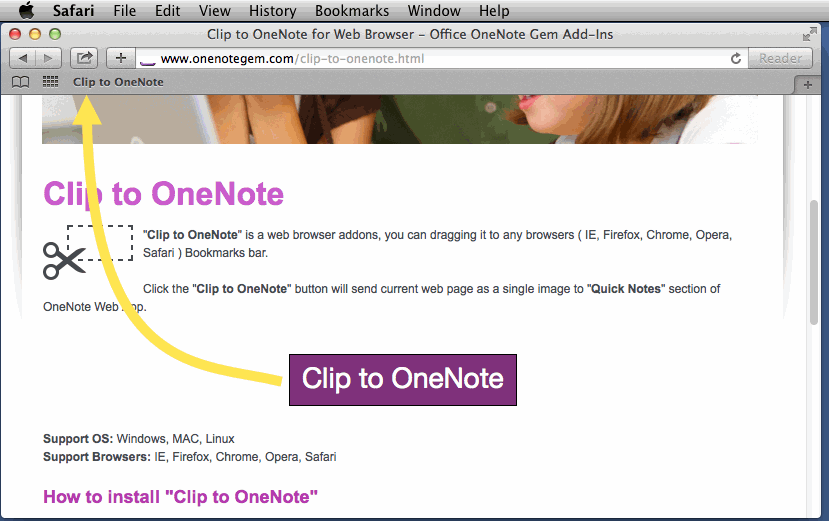
- Use Mac Safari navigate to "Clip to OneNote" web page.
- Drag the "Clip to OneNote" button to Mac Safari bookmarks bar.
How to use the "Clip to OneNote" in Mac Safari
It will send current web page as a large image into "Quick Notes" section of OneNote Web App.
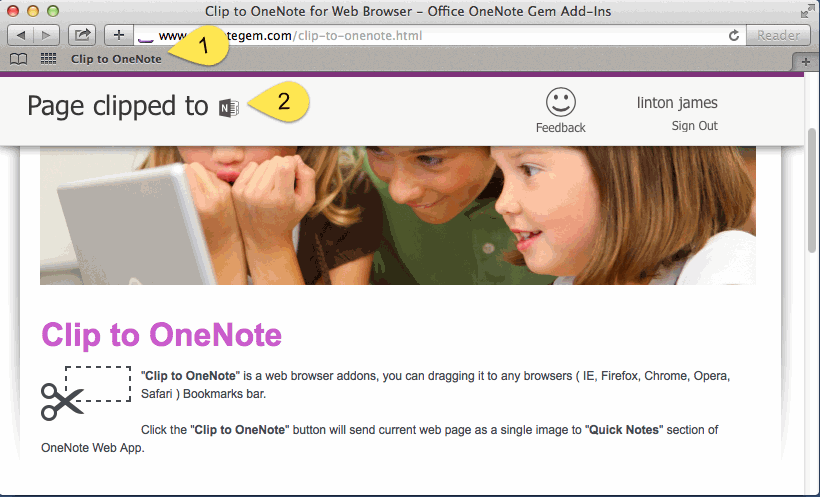
- Just simple click the "Clip to OneNote" on Mac Safari bookmarks bar.
-
Sign in your OneNote with account.
( Another tools - Bring to Mac OneNote don't need sign in ) - Next click the "OneNote Icon" after "Page clipped to".
It will send current web page as a large image into "Quick Notes" section of OneNote Web App.
With this simple tools, you can send any web page to OneNote now.
| EXE Addins | Cloud Addins | MAC Addins |
Related Documents
- How to roll back a OneNote notebook to recover lost sections caused by moving them?
- Why didn't use for a few months, cannot open any OneNote files now?
- 2026.6.6 Edge 149 remove Sidebar, and remove OneNote Feed
- OneNote shortcuts can't be deleted
- OneNote 2021 will be retired on October 13, 2026, and Microsoft will end support

