Close the Notebook Without run Office OneNote
2026-06-26 20:19
Sometimes, due to OneNote synchronization, OneNote crashes and crashes as soon as you run it. There was no time to close the OneNote notebook.
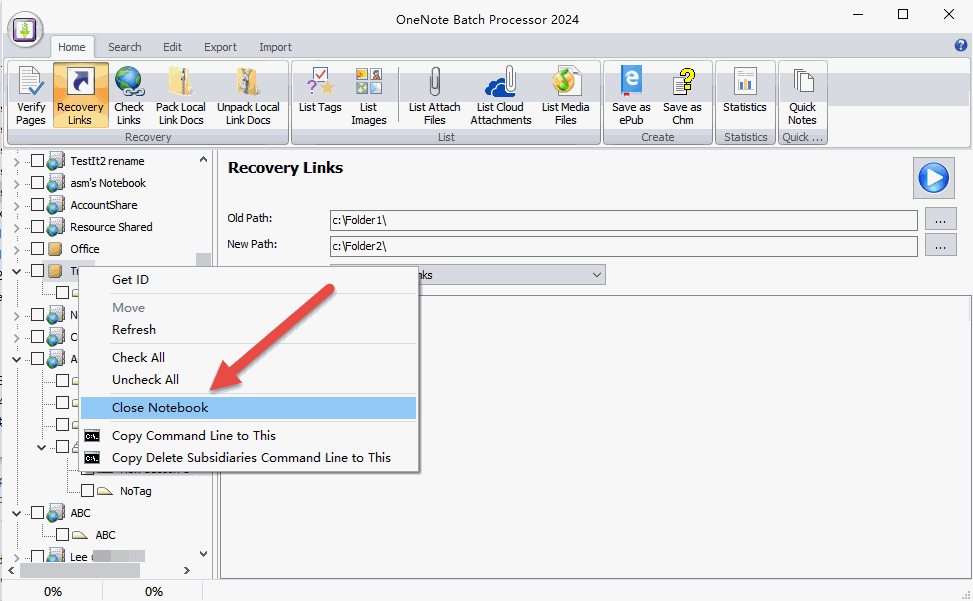
The OneNote Batch offers a "Close Notebook" feature.
After OneNote Batch runs, it lists all notebooks in Office OneNote on the left side.
Right-click the notebook you want to close, then click the Close Notebook menu in the pop-up right-click menu. You can close this notebook.
This way, running OneNote won't crash.
The OneNote Batch offers a "Close Notebook" feature.
Close Notebook
You can open OneNote Batch when OneNote is not running.After OneNote Batch runs, it lists all notebooks in Office OneNote on the left side.
Right-click the notebook you want to close, then click the Close Notebook menu in the pop-up right-click menu. You can close this notebook.
This way, running OneNote won't crash.

