View Mac OneNote notebooks, section groups, sections sizes to prevent exceeding the 2GB size limit in OneDrive.com
2026-01-07 09:14
Mac OneNote itself does not provide the ability to view the amount of hard disk space occupied by notebooks, section groups, and sections.
OneNote Batch for Mac v9.0 provides this feature, allowing you to easily find which OneNote notebook or section takes up more space.
In OneNote Batch for Mac:
OneNote Batch for Mac will list the sizes of the checked notebooks, section groups, and sections below.
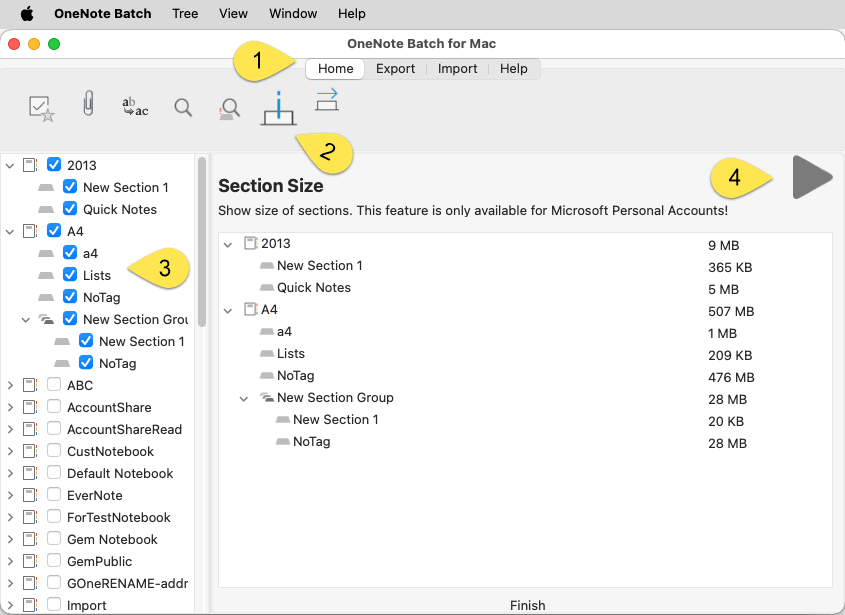
We can check the space size listed here to organize the notebook that exceeds the space limit.
The larger the section, the more difficult it is to synchronize
The larger the section, the more likely it is to cause damage, and the damaged section will not be synchronized.
OneNote Batch for Mac v9.0 provides this feature, allowing you to easily find which OneNote notebook or section takes up more space.
Section Size
In OneNote Batch for Mac:
- Click “Home” tab
- Then, click “Section Size” feature
- In the notebook tree on the left, check the notebooks, section groups, and sections you want to calculate
- Finally, click the "Start" button on the right side.
OneNote Batch for Mac will list the sizes of the checked notebooks, section groups, and sections below.
Scene
Because OneDrive.com has a size limit for OneNote notebooks and sections, the limit is only < 2GB size.We can check the space size listed here to organize the notebook that exceeds the space limit.
The larger the section, the more difficult it is to synchronize
The larger the section, the more likely it is to cause damage, and the damaged section will not be synchronized.
Related Documents
- How to import local .one files into a notebook of Mac OneNote as sections?
- How to Backup Multiple Sections without Mac OneNote installed?
- How to Copy Multiple Sections and Section Groups to the Specified Notebook or Section Group at Once for Mac OneNote?
- How to recover sections that disappeared due to moving or renaming in the Mac OneNote client?

