View OneNote notebooks, section groups, sections sizes to prevent exceeding the 2GB size limit in OneDrive.com
2026-01-02 07:17
OneNote itself does not provide the ability to view the amount of hard disk space occupied by notebooks, section groups, and sections.
OneNote Batch Cloud v7.0 provides this feature, allowing you to easily find which OneNote notebook or section takes up more space.
In OneNote Batch Cloud:
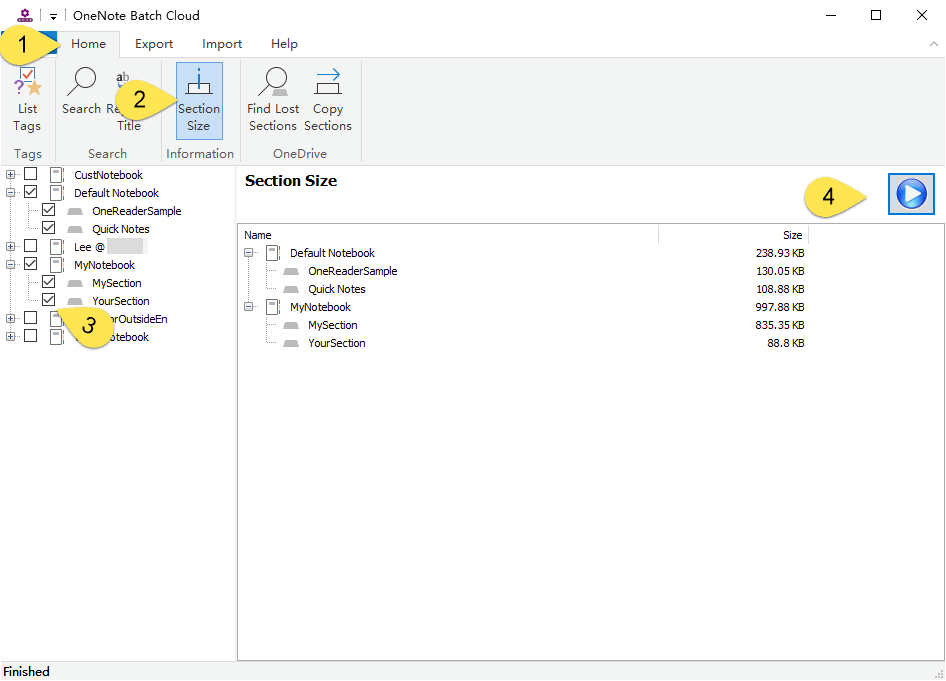
OneNote Batch Cloud will list the sizes of the checked notebooks, section groups, and sections below.
We can check the space size listed here to organize the notebook that exceeds the space limit.
The larger the section, the more difficult it is to synchronize
The larger the section, the more likely it is to cause damage, and the damaged section will not be synchronized.
OneNote Batch Cloud v7.0 provides this feature, allowing you to easily find which OneNote notebook or section takes up more space.
Section Size
In OneNote Batch Cloud:
- Click “Home” tab
- Then, click “Section Size” feature
- In the notebook tree on the left, check the notebooks, section groups, and sections you want to calculate
- Finally, click the "Start" button on the right side.
OneNote Batch Cloud will list the sizes of the checked notebooks, section groups, and sections below.
Scene
Because OneDrive.com has a size limit for OneNote notebooks and partitions, the limit is only < 2GB size.We can check the space size listed here to organize the notebook that exceeds the space limit.
The larger the section, the more difficult it is to synchronize
The larger the section, the more likely it is to cause damage, and the damaged section will not be synchronized.
Related Documents
- How to import local .one files into a OneNote notebook on OneDrive.com as sections?
- How to Backup Multiple Sections without Windows OneNote installed?
- How to Copy Multiple OneNote Sections and Section Groups to the Specified Notebook or Section Group at Once?
- Find and Download Sections that disappear due to moving or renaming in the OneNote client

