Search
OneNoteGem
  • Home
  • Addins
    • Windows Office Addins >
      • Gem for OneNote
      • OneNote Search Bar
      • OneNote Gem - Favorites
      • OneNote Batch
      • Pons for MindManager and OneNote
      • Mind Map for OneNote
      • Pons for Visio and OneNote
      • Row to OneNote
      • Auto OneNote
      • Favorite to OneNote
      • Bridge for EndNote and OneNote
      • Anchor to OneNote
      • Anchor to OneNote for PDF
      • Bring to OneNote
      • Gem Table for OneNote
    • Windows Cloud Addins >
      • CiteBoard for OneNote
      • OneReader
      • OneMind for Web OneNote
      • OneNote Reminder Cloud
      • OneNote Batch Cloud
    • Mac Addins >
      • Gem Menu for Mac OneNote
      • CiteBoard for OneNote
      • Bring to Mac OneNote
      • OneMind for Mac OneNote
      • OneNote Reminder for Mac
      • OneNote Batch for Mac
      • Fix One for Mac - Fix OneNote Login, Sync Tools
    • Android Addins >
      • CiteBoard for OneNote
      • Fix One for Android - Fix OneNote Login, Sync Tools
    • Cross-Platform Addins >
      • OneNote Reminder
      • OneMind for OneNote
      • CiteBoard for OneNote
      • Fix One - Fix OneNote Login, Sync Tools
    • Markdown Addins >
      • Gem for OneNote
      • One Markdown
    • Mind Map Addins >
      • OneNote Gem - Favorites
      • Pons for MindManager and OneNote
      • Mind Map for OneNote
      • Pons for Visio and OneNote
      • OneMind for OneNote
    • Other Addins >
      • Gem Menu for OneNote UWP
      • One Markdown
      • Clip to OneNote
      • WordNote
      • OneShare
      • Fix One for Windows - Fix OneNote Login, Sync Tools
  • Buy
  • Documents
  • FAQs
  • Templates
  • Support
  • Release
  • WordNote
Mind Map for OneNote
 
 
Using OneNote native elements to create Mind Map

Download and Install Revived OneNote for Windows 10 from Gem Menu

2026-04-23 06:12


Uninstall OneNote for Windows 10 on Your Computer

If OneNote for Windows 10 is already installed on your machine, you will need to uninstall OneNote for Windows 10 first.
 

Download and Install Gem Menu for OneNote UWP

Download and install from here: Gem Menu for OneNote UWP
 

“Download OneNote UWP Reviver” Menu Item in Gem Menu

After installed Gem Menu for OneNote UWP, it automatically runs in the tray area in the bottom right corner of Windows. (generally folded in ^).
  1. Click on the ^ (tray folding area) in the bottom right corner of Windows
  2. Click Gem Menu icon
  3. Click “Gem” menu
  4. Click “Download OneNote UWP Reviver” menu item.
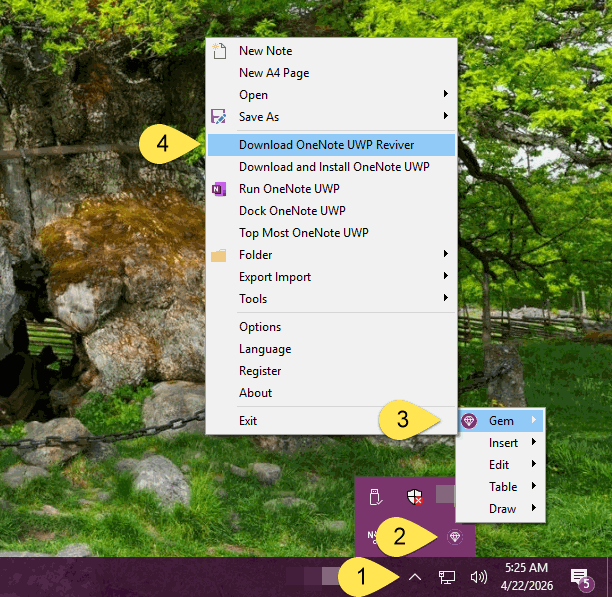
 “Download OneNote UWP Reviver” Menu Item in Gem Menu


Download Microsoft.Office.OneNote_16001_UWPReviver.zip

Once you have entered your Microsoft account correctly to sign in, you will be redirected to the download page for Microsoft.Office.OneNote_16001_UWPReviver.zip.
Click the ↓ icon in the upper left corner to download Microsoft.Office.OneNote_16001_UWPReviver.zip.
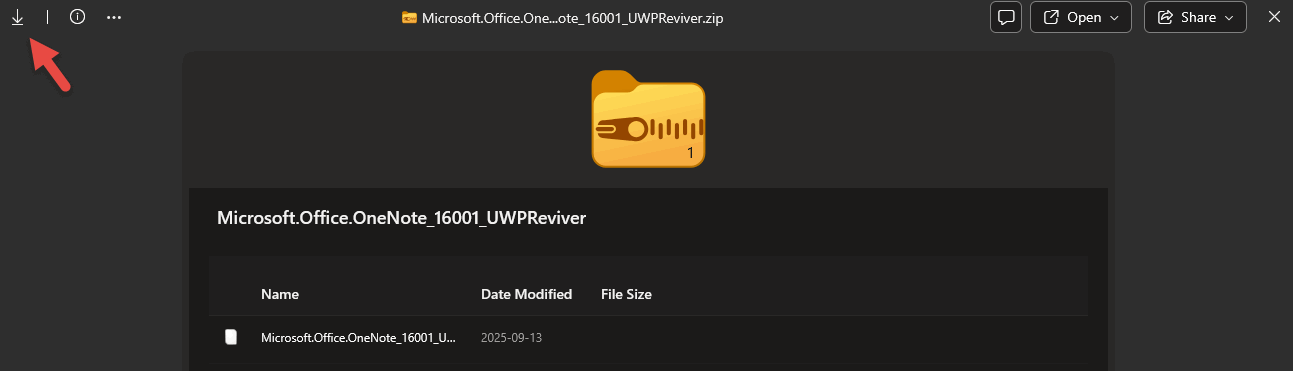
Download Microsoft.Office.OneNote_16001_UWPReviver.zip

Unzip Microsoft.Office.OneNote_16001_UWPReviver.zip

Unzip Microsoft.Office.OneNote_16001_UWPReviver.zip, which contains the following files:
  1. UWPReviver.exe
  2. Microsoft.Office.OneNote_16001.AppxBundle
 

Perform Install and Revive

Run UWPReviver.exe
Then click the 'Install and Revive' button, it will perform:
  1. Install Microsoft.Office.OneNote_16001.AppxBundle
  2. Set up OneNote for Windows 10。
 
After success, you can see the OneNote for Windows 10 program icon in the Windows Start menu, just click Run normally.
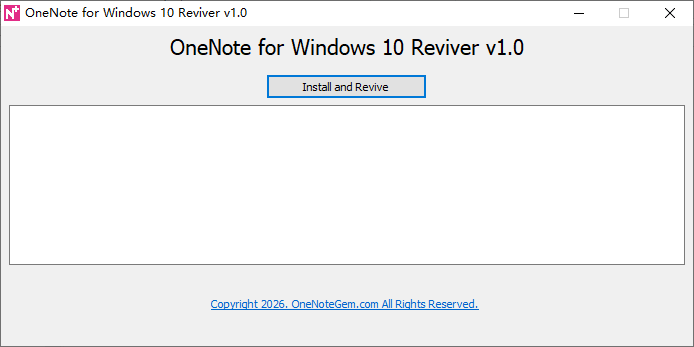
 

Install and Revive

OneNote for Windows 10 on Windows Start Menu
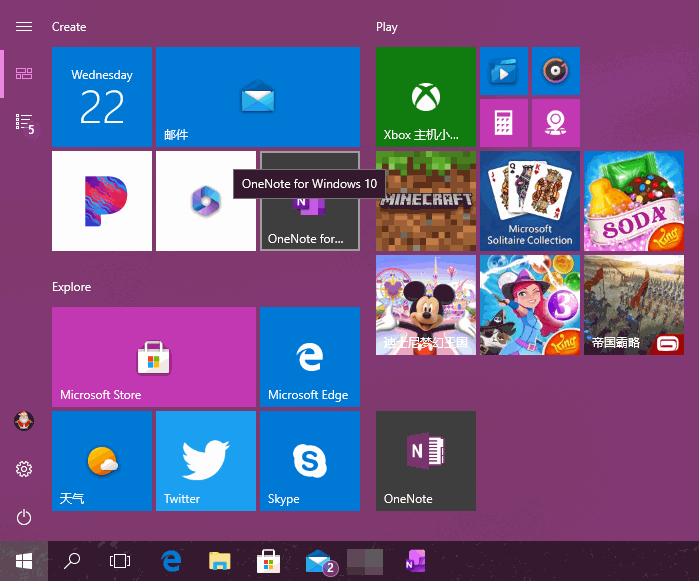

OneNote for Windows 10 on Windows Start Menu


Download Gem Menu for OneNote UWP

Related Documents

  • Download and install OneNote for Windows 10 via Gem Menu for OneNote UWP
  • How to Auto Run OneNote for Windows 10 when Windows Start?
  • Convert Formatted Text as a Table in OneNote UWP
  • UWP: Insert Horizontal Line into OneNote UWP
Command Line
Tag System
MindMap Add-Ins Comparison
Search Add-Ins Comparison
One Markdown Syntax
Table Formula
Gantt

Gem Menu Templates
Repair OneNote
OneNote Download
English website Chinese website
Mobile Site
Copyright © 2011-2026 Digital GemSoft. OneNoteGem.com All Rights Reserved.